
Chicken Salad Chick
Chicken Salad ChickLifestyle
4.82.55K Reviews
- Version
- 4.2.23
- Installs
- 500.00K
- Age Rating
- Everyone
Screenshots
Our Review of Chicken Salad Chick
 Analysis by Appyee
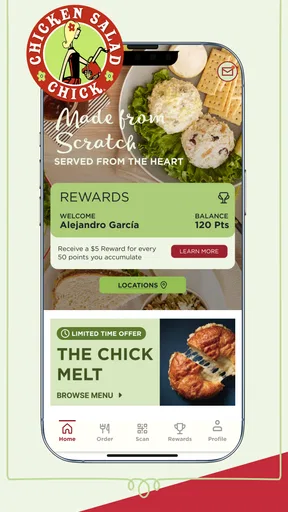
I approached Chicken Salad Chick as a practical companion for visits to the restaurant, rather than as a general food or lifestyle planner. The app is free, belongs to the Lifestyle category, and comes from Chicken Salad Chick, so its usefulness is closely tied to what you want to do with that restaurant: keep track of rewards, redeem benefits, and place an order from your phone. That narrow focus is also its biggest strength. It does not try to become a universal dining app.
My overall impression is positive, especially if Chicken Salad Chick is already part of your regular lunch routine. The app has a 4.8 average from around 19 thousand ratings and has passed 500 thousand installs, which suggests that it has found a clear audience. I would not treat those figures as a substitute for personal experience, but they do fit what the app feels like in use: a focused loyalty and ordering tool that makes repeat visits easier when your phone has a dependable connection.
How the app feels when your order depends on a connection
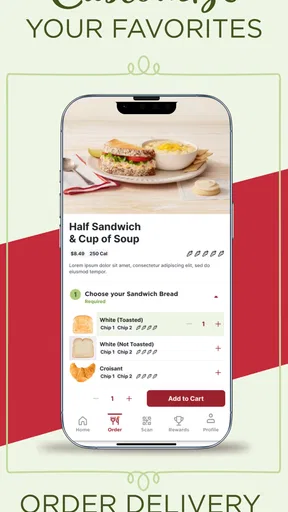
The central experience is built around a simple sequence. I open the app when I am thinking about a meal, use it to order online when that option suits the visit, and check the rewards side when I want to earn or redeem something. That sounds straightforward, but the timing matters. The app is most useful before I reach the restaurant, while I still have enough time to review the order and wait for the screens to respond.
Connectivity shapes nearly every important moment. Browsing, sending an order, checking account-related progress, or presenting a reward all depend on the app being able to communicate with its service. I would not plan around it as though it were a paper loyalty card stored entirely on the phone. A weak signal can turn a quick pickup plan into a slower process, particularly if I wait until I am standing at the counter or sitting in a crowded parking lot.
That is the first practical lesson: use the app before the last possible moment. If I know I am heading out for lunch, I would rather prepare the order while connected to reliable Wi-Fi or a strong mobile signal. This gives me time to notice a problem, adjust the order, or choose another way to complete the visit instead of discovering a connection issue when I am already hungry.
Ordering works best as a planned part of the visit
For a normal weekday scenario, imagine leaving work with a short lunch break. I can open the app before walking to the car, make the order, and use the travel time to let the request go through. That workflow is more comfortable than trying to do everything after arriving. It also reduces the temptation to rush through choices while other customers are waiting nearby.
The app makes the most sense for people who already know what they like at Chicken Salad Chick. A returning customer can use it as a shortcut between deciding to eat and getting the order underway. Someone visiting for the first time may still prefer to look at the restaurant's options in person, ask questions, or take more time with the menu. The app does not remove the value of that human interaction.
I also see a useful distinction between ordering ahead and using the rewards tools. Ordering is time-sensitive: a delay in sending information matters immediately. Rewards are more about account continuity and remembering to use the benefit at the right point. Treating those as separate habits helps. I would place the order early, then check the rewards area before finalizing the visit rather than waiting until the handoff.
Mobile use is convenient, but the setting changes the experience
This is clearly designed for a phone, and that matters because restaurant decisions often happen while moving. I might be walking from an office, sitting in a passenger seat, or deciding on dinner from home. The smaller screen is an advantage when I need speed, but it is less comfortable when I want to compare several choices carefully. I prefer making a considered order somewhere stationary, then using the app for the final steps when I am ready.
There is also a social advantage to preparing an order before reaching the restaurant. If I am ordering for myself, the app can keep the process focused. If I am ordering for a small group, I would first collect everyone's choices and confirm them before opening the app. That simple preparation avoids the awkward situation of passing one phone around while people change their minds and the connection keeps timing out.
For families, the Everyone content rating makes the app broadly approachable from an age-classification standpoint. That does not automatically make every ordering situation effortless, though. A parent may still want to review the order personally, especially when several meals or reward decisions are involved. The app is a tool for completing the visit, not a replacement for checking that the final order is correct.
Device compatibility is another practical consideration. The current version is 4.2.23 and requires Android 7.0 or later. That covers many Android phones, but anyone using an older device should check compatibility before building a routine around it. I would also keep the app updated when possible, since restaurant ordering is the kind of service where an outdated version can become inconvenient at exactly the wrong time.
What happens when the network is slow or the process breaks?
The biggest weakness is not that the app is complicated; it is that a connection problem can affect the parts I care about most. If a page takes too long to load, I may not know whether the request is still processing, whether I should try again, or whether repeating the action could create confusion. That uncertainty is common in connected ordering tools, and it is why I avoid tapping repeatedly when the screen appears stuck.
My preferred recovery method is cautious. I first wait briefly and look for a clear change in the app. If nothing happens, I check whether the phone itself still has a working connection by opening another familiar service. If the wider connection is fine, I close and reopen the app, then review the order state before attempting anything again. I would rather spend a minute verifying than risk submitting the same request twice.
When I am already at the restaurant, I keep a backup plan in mind. If the app does not respond, I can speak with staff and complete the visit another way. That is not a criticism unique to this app; it is simply good practice for any phone-based ordering system. The important point is not to assume that a reward or order is active just because I tapped a button. I want visible confirmation before I rely on it.
Connectivity can also fail in less obvious ways. A phone may show signal bars but still struggle with a congested network. A public Wi-Fi connection may require an extra sign-in step. Battery-saving settings can make switching between screens feel slower. I do not need to diagnose every technical cause, but I do need to recognize that the app's smoothest experience happens when I prepare away from the restaurant's busiest moments.
Using it without wasting mobile data
For most people, ordinary app use should not be a major data concern, but restaurant visits are easy to organize more efficiently. I would use Wi-Fi at home or work to prepare a planned order, especially if I am reviewing several options or expecting to spend time in the app. Then I would keep mobile data available for the final practical moments rather than making the entire process depend on a crowded location.
That approach also helps with reliability. A stable home connection gives me a calmer environment to check the order, while mobile data remains useful if plans change on the way. I would not turn off connectivity immediately after placing an order, because I may still need the app to refresh or display the relevant result. Instead, I would conserve data through timing rather than treating the app as something that must be used continuously.
There is a trade-off between convenience and control here. The app is valuable because it puts ordering and rewards in one place, but that convenience encourages me to check it at the restaurant, where the signal may be less dependable. My solution is to think of it as a preparation tool first and an in-store tool second. That small change makes the experience feel more deliberate and reduces last-minute friction.
Rewards are most useful when they become a habit
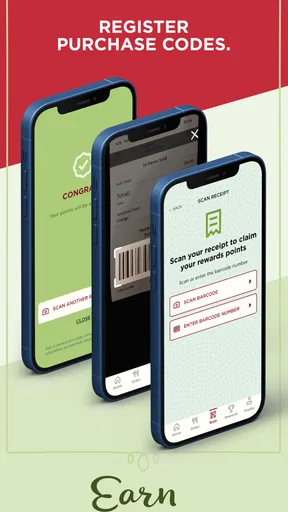
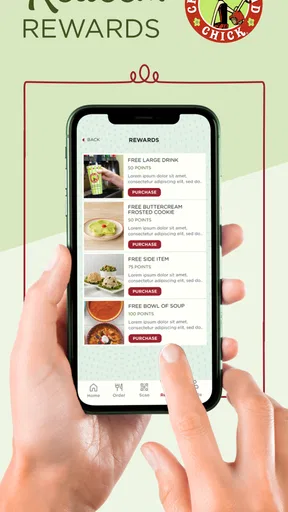
The rewards side is easy to overlook when the immediate goal is simply lunch. I found it more useful when I treated it as part of the ordering routine rather than as a separate feature I would remember occasionally. Before completing a visit, I would check whether there is a reward to redeem and whether the account activity is reflected as expected. That habit is more reliable than trying to reconstruct past visits later.
This is also where the app differs from using a restaurant website casually. A browser can be fine for a one-time look at ordering information, but a dedicated app is better suited to repeated visits because it keeps the loyalty activity close to the ordering action. I would choose the app over a generic food-delivery service when my priority is Chicken Salad Chick's own ordering and rewards experience.
On the other hand, a delivery marketplace may be a better fit when I am comparing several restaurants, coordinating food from different places, or relying on one platform's delivery workflow. That kind of service offers broader choice, while this app offers a more direct relationship with one restaurant. Neither is universally better; the right choice depends on whether loyalty to Chicken Salad Chick matters more than convenience across multiple restaurants.
Who should install it, and who can skip it?
I would recommend it to regular customers, people who often order ahead, and anyone who wants to make rewards part of their normal restaurant routine. It is especially sensible if the nearest Chicken Salad Chick is a place I visit often enough that remembering a loyalty benefit has real value. Since the app is free, the decision is mainly about whether the restaurant-specific tools match my habits.
I would be less enthusiastic for someone who visits only once, prefers speaking with staff, or already uses a broader service for all restaurant orders. Installing a dedicated app for a single occasional meal may not add much. It is also not the best choice for someone who expects every function to remain dependable without a network connection. The connected nature of ordering and rewards should be treated as a basic part of the experience.
The developer is Chicken Salad Chick, which gives the app a clear purpose instead of making it feel like a general-purpose loyalty wallet. That focus helps keep the experience understandable, but it also limits its usefulness outside that restaurant. I appreciate the honesty of that trade-off: it does one restaurant's digital tasks rather than pretending to solve every dining problem.
My final view on its connected experience
After using it as a restaurant companion, I see Chicken Salad Chick as a worthwhile download for repeat customers, provided they use it with realistic expectations about connectivity. It is free, focused, and most helpful when I prepare an order before arriving, check rewards as part of the same routine, and avoid repeated taps when a network response is slow.
The app's strongest quality is not flashy complexity. It is the way ordering and loyalty activity meet in one restaurant-specific place. Its main limitation is equally clear: when the connection is unreliable, the convenience can quickly become uncertainty. I would keep a normal in-person backup available and confirm important actions before moving on.
For my own routine, the verdict is positive. I would choose it over a generic browser visit when I am returning to Chicken Salad Chick, and over a broad delivery platform when earning or redeeming restaurant rewards matters more than comparing many restaurants. I would skip it for rare visits or if I need an experience that works independently of a network. Used at the right time and with a little preparation, it makes a familiar meal easier to organize without adding much effort.
Its release history reaches back to Jan 16, 2015, and the current Android requirements remain accessible to devices running Android 7.0 or later. Those details make it a practical option for many Android users, while the Everyone rating keeps its audience broad. In the end, I recommend it not because every visit will be flawless, but because it gives frequent Chicken Salad Chick customers a useful, direct way to manage the parts of the meal that are easiest to handle before they reach the counter.
Verdict
Strengths of Chicken Salad Chick
- Easy access to menu items and restaurant information on the go.
- Convenient ordering features can save time during busy visits.
- Useful location details help users find nearby Chicken Salad Chick restaurants.
- Simple interface makes browsing the brand’s offerings straightforward.
- May provide access to promotions or rewards, depending on availability.
Limitations of Chicken Salad Chick
- Features and availability may vary by location.
- Some ordering options may depend on participating restaurants.
- The app may offer limited value for users without a nearby location.
- Promotions and rewards can change or include usage restrictions.
- An account may be required to access certain ordering or loyalty features.
Similar Picks in This Category
View All
SmartThings
Samsung Electronics Co., Ltd.4.6

Google Home
Google LLC4.0

Pinterest4.2

Astrotalk - Talk to Astrologer
Astrology & Horoscope4.7

My Verizon
Verizon Consumer Group4.5

Samsung Wallet (Samsung Pay)
Samsung Electronics Co., Ltd.4.1
Frequently Asked Questions
What is the Chicken Salad Chick app used for?
The Chicken Salad Chick app is designed to make ordering from the restaurant more convenient. After installing it, you can browse the menu, review chicken salad flavors and other food options, customize eligible items, place pickup or delivery orders where available, and find nearby locations. It can also help returning customers reorder favorites and keep track of restaurant promotions or rewards, depending on the features offered in your area.
Can I order Chicken Salad Chick for pickup or delivery through the app?
Yes, the app generally supports digital ordering for pickup, and delivery may be available depending on your location and local restaurant coverage. You normally select a nearby store first, choose the preferred ordering method, add menu items to your cart, and select an available time. Delivery fees, minimum order requirements, estimated times, and service availability can vary by restaurant and third-party delivery coverage.
Does the Chicken Salad Chick app offer rewards or special promotions?
Chicken Salad Chick may provide loyalty benefits, rewards, promotional offers, or digital account features through its app. These benefits can change over time and may require you to create an account or join the restaurant’s loyalty program. Before ordering, check the rewards section carefully for expiration dates, qualifying purchases, location restrictions, and whether an offer can be combined with other discounts or redeemed on delivery orders.
What menu items can I find in the Chicken Salad Chick app?
The app typically includes the restaurant’s signature chicken salad varieties, sandwiches, scoops, soups, sides, desserts, beverages, and meal combinations. Menu availability can differ between locations, and some items may be temporarily unavailable during busy periods. Product descriptions, ingredients, and customization choices are useful for planning an order, but customers with allergies or dietary restrictions should confirm details directly with the restaurant before purchasing.
Is the Chicken Salad Chick app free to download and safe to use?
The Chicken Salad Chick app is generally free to download, although you still pay for the food, applicable taxes, delivery charges, and any service fees associated with an order. The app may request account, payment, location, and notification permissions to provide its features. For safer use, download it from the official Google Play Store or Apple App Store, review permissions, and use secure payment information when checking out.
